THE_STRIP 3
THE CHANNEL STRIP THAT MIXES YOUR WHOLE SESSION.
One listen builds the chain. One button balances the mix. You decide who wins.
LIMITED INTRODUCTION OFFER


THIS IS WHAT MIXING SHOULD FEEL LIKE.
Why do I need THE_STRIP 3?
You know exactly where your mix dies. The vocal won't cut through, so you reach for another EQ. Now the guitars sound hollow, the drums are suddenly too loud, and the low end turns to mud. Fifty plugin windows later you can't hear straight anymore — and the song you loved this morning is buried under its own mix.
Here's what twenty years of mixing taught me: a mix is only three decisions. What does this track need? How loud should it sit? And who wins when two sounds fight for the same space?
So I built the strip that clears everything between you and those three decisions. It listens to your track, sets its own level and builds the whole chain in seconds. One button balances your entire session. And when the vocal and the guitars fight, the guitars step aside — only while the vocal sings. No routing, no sidechain cables, no wall of windows.
You just decide who wins. That was always the fun part anyway.
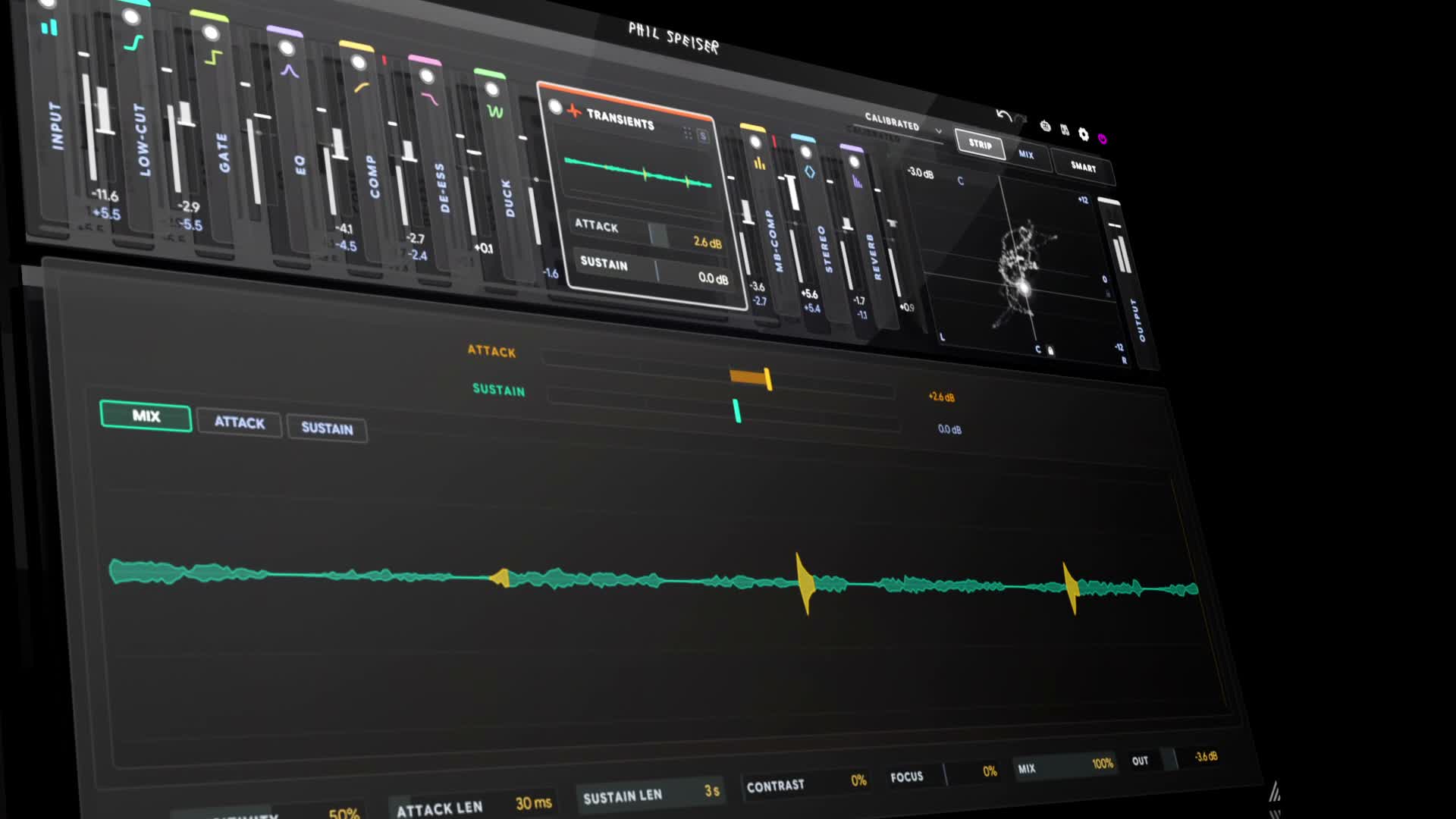
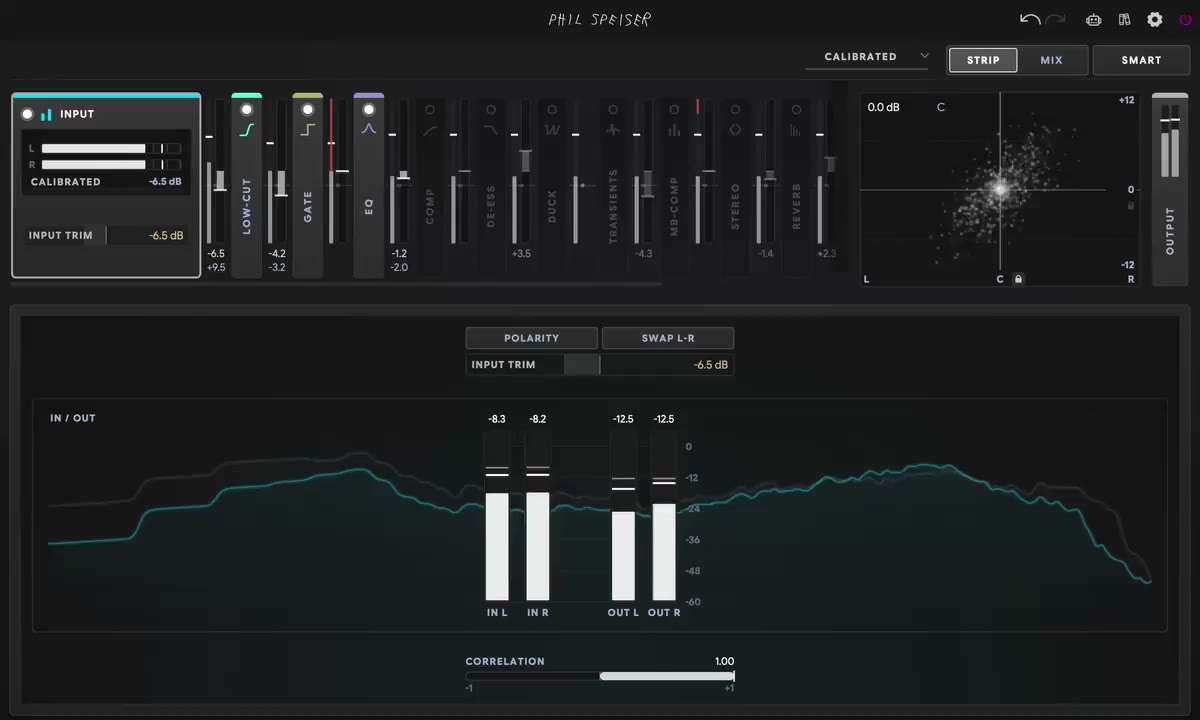
YOUR WHOLE CHAIN IN ONE PLUGIN.
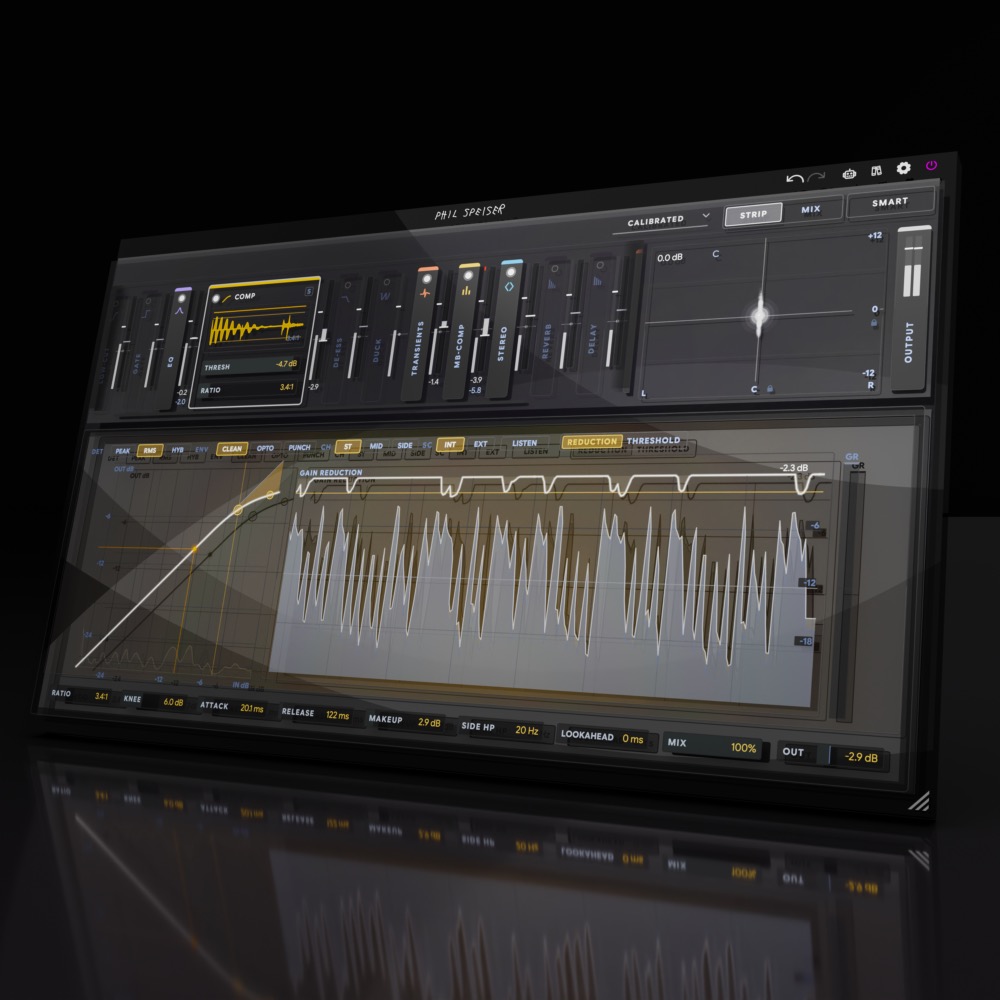
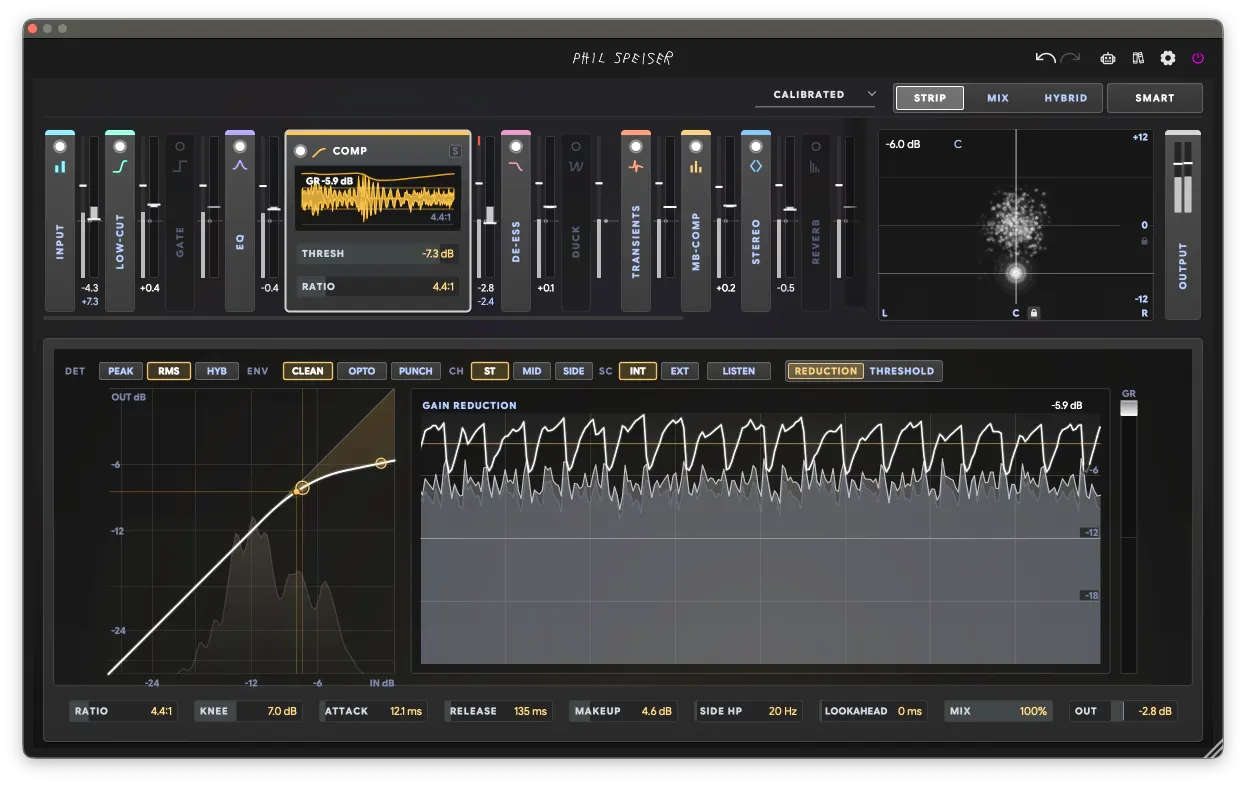
Fifteen modules, from the first trim to the final limiter, on any track.
Let one listen build the chain, then open any module and fine-tune as deep as you like.
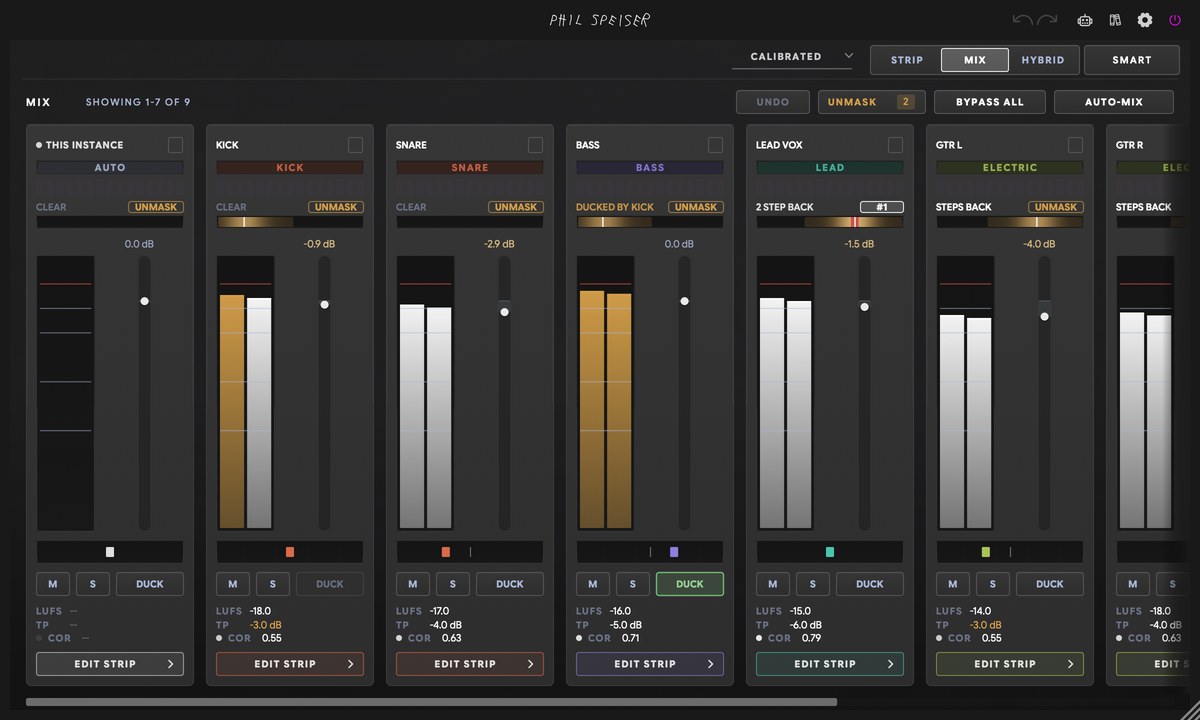
PRESS M AND YOUR WHOLE MIX IS IN ONE WINDOW.
This is the moment you'll want to show somebody. Every THE_STRIP 3 in your session finds the others by itself — no routing, nothing to set up. Press M in any one of them and there's your whole song: faders, pans, meters, solo and groups for every track.
Need to fix the snare? Click EDIT STRIP on its channel and its whole chain opens right there, in the same window. No more digging through fifty plugin windows. It even works out which tracks are your buses and your master. By listening.
Recorded a drum kit with a handful of mics? PHASE ALIGN lines them all up in one press.
DECIDE WHO WINS.
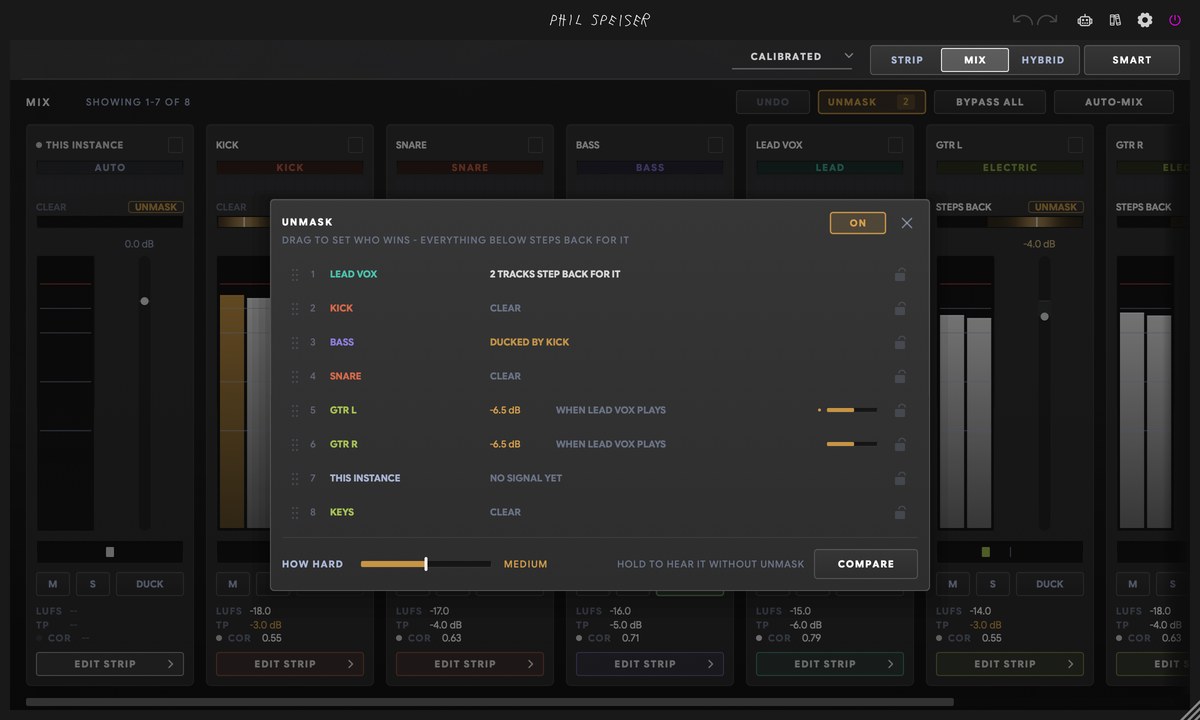
Masking is the real reason mixes turn to mud: two tracks fighting for the same frequencies at the same time. UNMASK turns that fight into one simple list: your whole session, lined up by who matters most.
Drag the vocal to the top, the synths under it, the guitars below, and everything steps back for whatever outranks it — only where they collide, and only while the winner plays. You're not carving EQ anymore. You're deciding who carries the song.
Kick versus bass — the oldest fight in the room — has its own answer: the DUCK moves the bass out of the kick's way, in time with it and only in the low end. No sidechain cable to wire.
ONE BUTTON. A MIXED SESSION.
Press AUTO-MIX and listen to what happens. It builds the chain on every strip that needs one, unmasks your tracks, ducks the bass under the kick and balances the levels across your tracks, your buses and your master — all while your song plays.
It hears what belongs together, too: six stacked rhythm guitars come down as one section, and the balance between them stays where you had it.
It's not the finished record — it's the balanced starting point you'd otherwise spend a full day building, delivered in the time it takes to play your song. You take it from there: ask for VOCAL FORWARD or MORE BASS in one click, reorder who wins, ride the faders. And one undo takes back the whole run.
WATCH AUTO-MIX BALANCE A WHOLE SESSION
30-DAY MONEY-BACK GUARANTEE · MINI INCLUDED · EVERY FUTURE UPDATE FREE
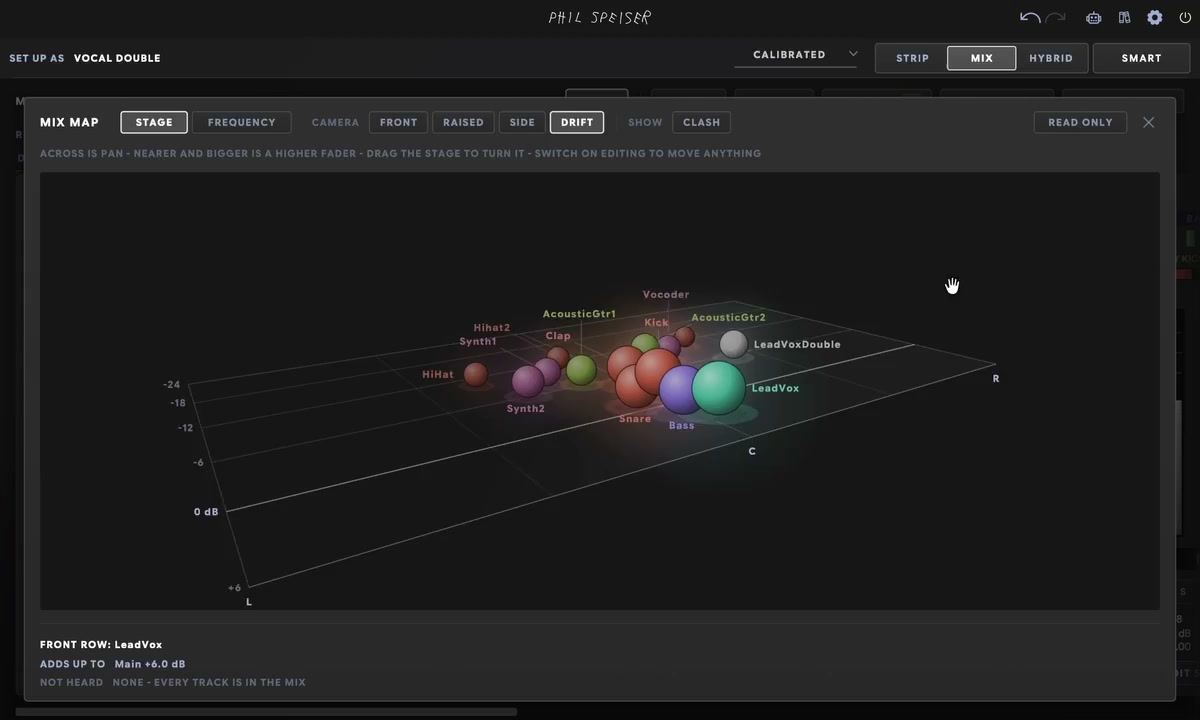
YOUR MIX, SEEN FROM THE AUDIENCE.
Forty faders are forty numbers — and numbers never show you the shape of a mix. Press MAP and your session becomes a stage seen from the audience: left to right is the pan, and the higher a track's fader, the nearer and bigger it stands.
The loudest thing in your mix is the big one at the front, and the track you forgot about is the small one in the corner.
Switch on EDITING and drag a track to where it should stand. Or flip to FREQUENCY and see who owns the lows, the mids and the highs — and exactly what UNMASK moved aside to make room for the vocal.
THE_STRIP 3 MINI — INCLUDED, AND LIGHT ENOUGH FOR EVERY TRACK.
The mixer, UNMASK and AUTO-MIX can only see tracks that carry a strip. That's what THE_STRIP 3 MINI is for: the same engine narrowed to the essentials — input, low-cut, EQ, compressor and duck — with zero latency and a fraction of the CPU. Drop it on forty tracks without thinking twice.
It shows up in the mixer like any other channel. One license covers both plugins, and every future update is free.
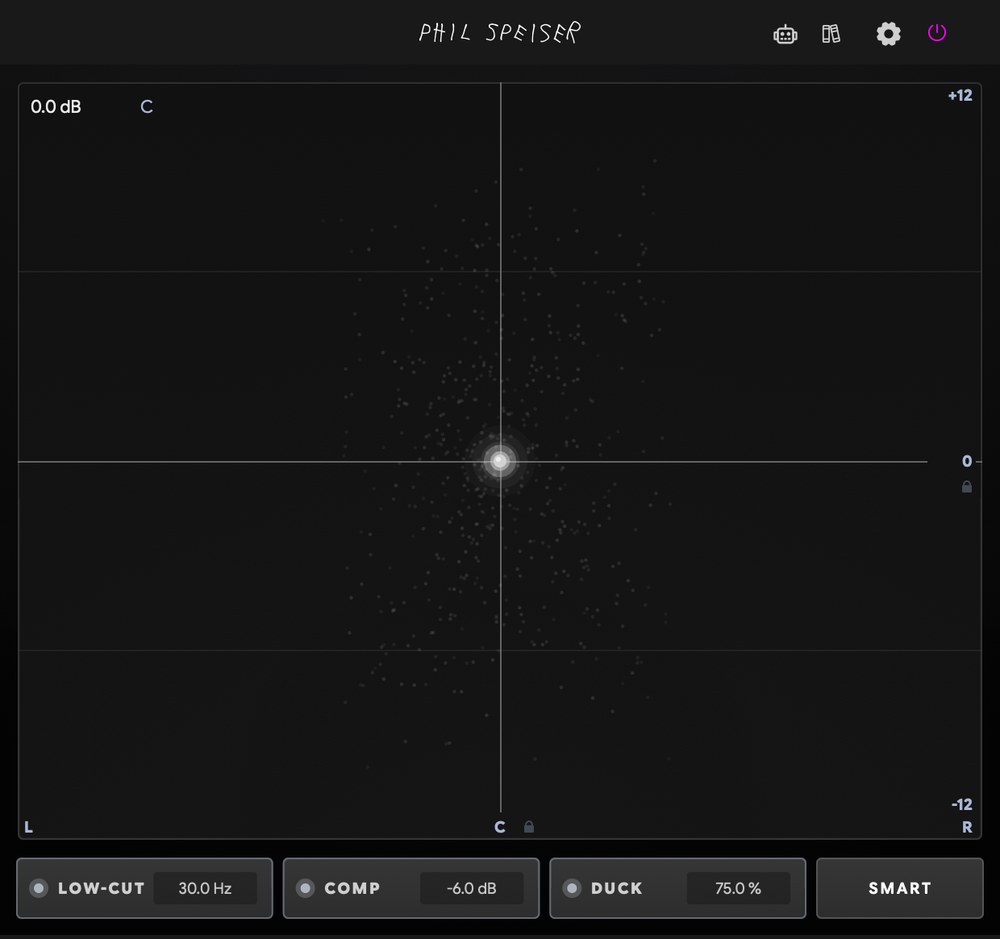
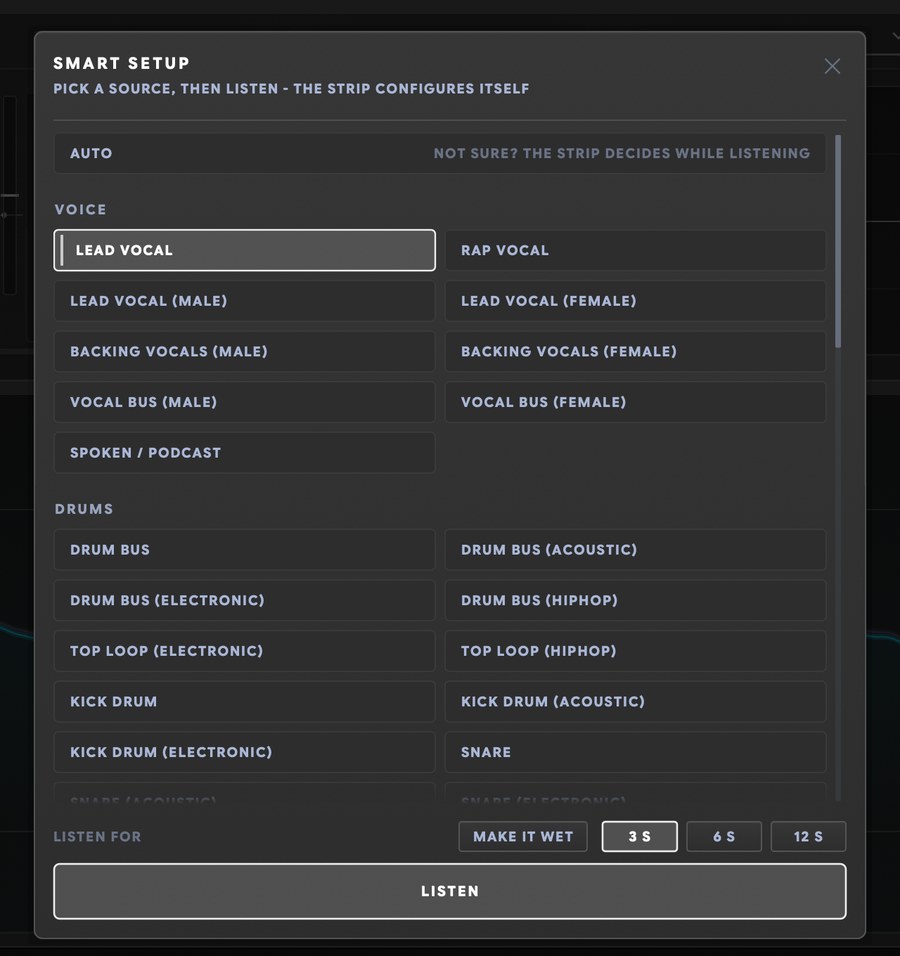
IT LISTENS TO YOUR TRACK. THEN IT BUILDS THE CHAIN.
Presets are made for somebody else's recording — that's why they never quite fit yours. So THE_STRIP 3 listens first. Pick LEAD VOCAL, or leave it on AUTO, and hit LISTEN: it analyses the audio playing on your track and builds the whole chain around it — the low-cut, the de-esser, EQ cuts on the exact resonances it found, compression that fits the material.
81 profiles cover everything from KICK DRUM to MASTER LOUD. Or teach it your own: play the track you want to sound like through THE_BRIDGE — a free download — and the sound you're chasing becomes a profile.
Then it tells you what it did, in plain language, so you pick up what a good chain looks like while you work. Every setting stays editable, and one undo takes it all back. The first ten minutes of every mix, handled in one listen.
YOU DECIDE HOW MUCH IT DOES.
Some days you want the strip to handle almost everything, so you can just move priorities around until the song feels right. Other days you want to grab one band of the EQ and argue with it for an hour. THE_STRIP 3 doesn't make you choose a camp.
Everything the smart features do lands as normal settings you can change or throw away. No black box, nothing locked — your attention stays on how it sounds.
FOUR STEPS TO A BALANCED MIX.
- 1. PUT IT ON YOUR TRACKS
- THE_STRIP 3 on what matters most — your vocal, your drum bus, your master. MINI on everything else. Each one guesses its source from the track name.
- 2. PRESS AUTO-MIX
- Loop the loudest part of your song. Every strip listens, builds its chain and finds its level while it plays.
- 3. DECIDE WHO WINS
- Open UNMASK and drag your tracks into order of importance.
- 4. MAKE IT YOURS
- Ride the faders, place tracks on the MAP, or open any module and go as deep as you like.
WHAT'S ACTUALLY IN THE RACK.
Drag them into any order. The strip sets its own working level, so every number you dial in means what it says.
INPUT
The right level before anything else happens.
LOW-CUT
Rumble gone, tone untouched.
GATE
Cleans up the gaps without chopping the sound.
DYNAMIC EQ
Six bands that can move with the music.
COMPRESSOR
Ask for 4 dB, get 4 dB.
DE-ESSER
Tames the S, never the voice.
DUCK
Pumps and pockets, no cables.
TRANSIENTS
Punch and body, dialled separately.
MULTIBAND COMP
Three compressors, one glue.
STEREO
Wide without falling apart in mono.
REVERB
Space that steps aside for the song.
DELAY
Echoes that groove by default.
MOD
Movement from one musical LFO.
WARMTH
Analog colour without the volume jump.
LIMITER
Loud, clean, honest to the last dB.
Between every pair of modules, a live meter shows exactly what just changed. Bypass is level-matched, so louder never fools you — and delta-solo lets you hear only what a module adds or removes.
I'VE BEEN MIXING FOR TWO DECADES. THIS IS THE DESK I ALWAYS WANTED.
Every setup I've ever mixed on made me do the same jobs by hand, through a spider web of routing. Here, the whole mix lives in one place — and now that it's finished, I still can't quite believe what it does.
The technical work is handled. The taste is still yours.
WATCH HOW I PRODUCE. THEN MAKE IT YOURS.
Hours of tutorials and masterclasses where I take you through my sessions, step by step. And in my AI-supported tutorials, you can ask questions in real time while you watch.
Loading TrustPilot data...








WORKS WITH ALL MAJOR MUSIC SOFTWARE
MAC (Intel or M-Processors) | WINDOWS
VST3, AAX, AU
Frequently Asked Questions
THE_STRIP 3 works with any music software hosting VST3, AAX, or AU plugins—like Ableton Live, Pro Tools, FL Studio, Logic, GarageBand, Cubase, and Reaper. Both Windows and macOS (including M1 and higher) are supported.
Yes. Press LISTEN and the strip builds the whole chain from your own audio, then tells you what it did in plain language. You get a strong starting point today, and you learn from every report. Hover over anything and a tooltip explains it, in English, German, French, Spanish or Italian. When you want to go deeper, every setting is right there.
No — it works on a single track like any channel strip. But the session features — the mixer, UNMASK, the kick ducking, AUTO-MIX — only see tracks that carry a THE_STRIP 3 or a MINI. That's what MINI is for: it's light enough to put everywhere, and it's included.
MINI runs five stages at a fraction of the full strip's CPU with zero latency, so you can put it on every track. The full strip only adds latency for what you switch on — lookahead, oversampling, true-peak limiting — and reports it to your DAW, so everything stays in time.
No. It only measures right after you change something, then holds. Nothing moves unless you touched something — and anything it is about to rewrite shows a breathing ring first, so you always see it coming.
Then mix by hand — every module has a full-depth editor, the rack reorders by drag, and nothing requires the smart features. They write settings you can read, tweak or throw away. Undo covers everything, including a whole AUTO-MIX run.
No. Whatever you moved after the last run is yours. Press AUTO-MIX again and the strips re-learn with your offset on top — the report even says so: "your +1.5 dB kept". An UNMASK order you dragged by hand survives every run too.
THE_STRIP 2 was my channel strip with smart features. This one is a mix system: it builds the chain from what it hears, every strip in your session connects into one mixer, and UNMASK, kick ducking and AUTO-MIX work across all of them. No routing anywhere. Read the whole story
I'm super confident you'll love THE_STRIP 3, but if you discover it's not the perfect fit within 30 days of purchase, just reach out. I'll handle a smooth license transfer and give you a full refund—no hassle.
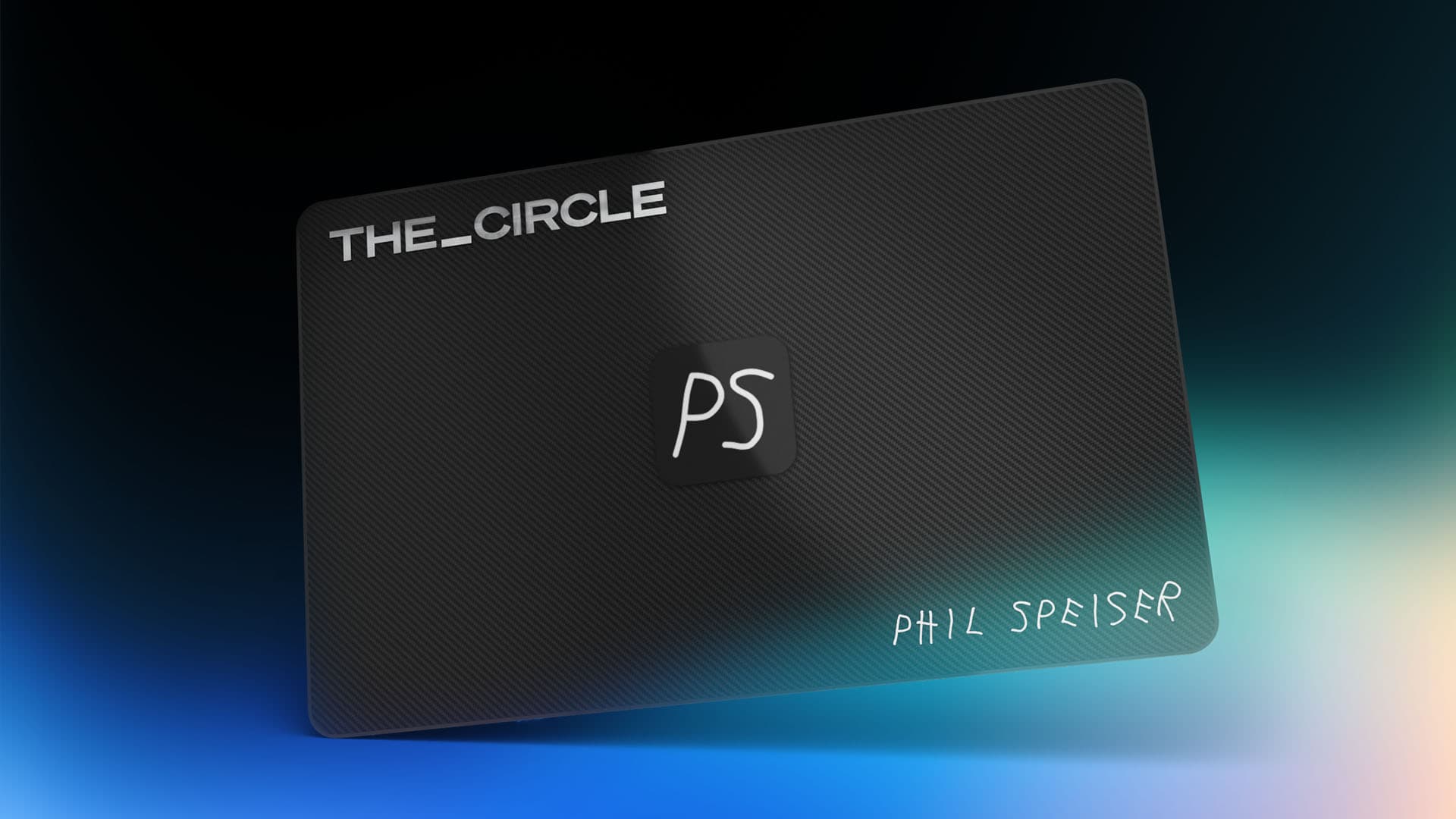
MY WHOLE MUSIC PRODUCTION WORLD. ONE MEMBERSHIP.
JOIN

Every plugin I make, including the ones that exist only in THE_CIRCLE. THE_CIRCLE APP with my web tools. Sample packs, masterclasses and early access to everything new.